:format(webp))
:format(webp))
Why marketers want visual editing — and developers still choose React — in headless CMS
Read this and you’ll understand the practical trade-offs behind modern headless CMS: why visual editors are now essential for marketing teams, why React remains the go-to for developers, where teams commonly get tripped up, and what technical choices make a headless setup actually fast, secure, and maintainable.
What “headless” really means — and why it mattered in the first place
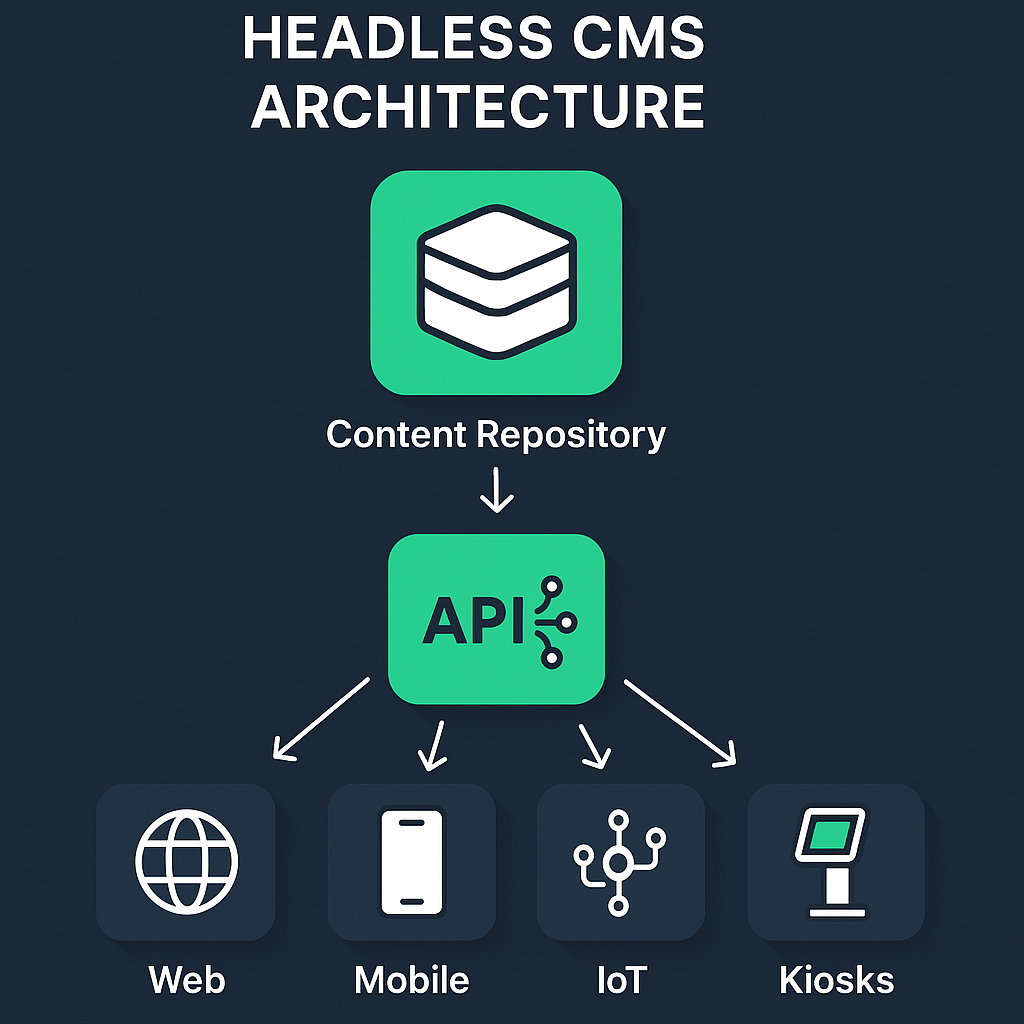
Headless CMS separates content storage and delivery from the presentation layer so the same content can be served to websites, mobile apps, kiosks, or IoT devices through APIs. This API-first approach gives developers the freedom to build with modern frameworks and to deliver content to multiple channels from one source of truth.
Why marketers love visual editors
Non-technical content people want to compose pages, position modules, and preview changes without editing code or waiting on engineering resources. Visual editors (live page builders and in-context preview) let marketers work in approximate final layouts and reduce back-and-forth with devs, improving time-to-publish and content autonomy (learn more from the Storyblok visual editor documentation ).

Why that matters: visual tooling is tied to marketer velocity — you can see changes in context, test variations quickly, and reduce simple editorial errors that would otherwise require developer fixes.
Why developers still prefer React and API-first stacks
Frontend teams favor React because of its component model, large ecosystem, and compatibility with modern SSR/SSG frameworks like Next.js, which make complex, performant experiences easier to build and reason about.
React + headless = flexible frontends that can be optimized independently of the CMS. Developers value the API-first model because it avoids coupling presentation to content storage and enables reuse across channels.
The friction points teams don’t always hear about
The promise of headless is real, but certain practical problems are common. Each problem below is one you should plan for, with links to deeper resources.
Adoption barriers for non-technical teams: Implementing headless often requires additional infra (build pipelines, preview servers, CDNs) and a steeper learning curve than traditional all-in-one platforms, especially for smaller teams without DevOps support.
The content velocity paradox: Adding rich visual editing can slow deployment cycles when the API, build process, or frontend bundling isn’t optimized for rapid iteration — more editor features don’t automatically equal faster shipping unless the delivery pipeline is tuned.
Content modeling is a hidden cost: Headless needs upfront structured content models to get reuse and omnichannel delivery right, and building those schemas takes time and discipline that traditional WYSIWYG CMSs often hide.
Preview hell in decoupled systems: Accurately previewing content across different frontends and devices in real time is technically tricky; live preview requires a preview API, preview builds, or snapshot rendering to match published output.
Decoupled security implications: Separating content and presentation creates new API attack surfaces and access-control boundaries that editorial teams might not fully understand, which can lead to misconfigured endpoints or exposed data if you don’t follow API security best practices (see the OWASP API Security Project ).
Vendor lock-in through API patterns: Although headless promises portability, different platforms expose different API shapes, query syntaxes, and features (Webhooks, GraphQL vs REST), which can make migrations difficult and subtly lock you in without careful design.
Measuring omnichannel ROI is complex: Headless enables reuse across channels, but teams often lack a measurement framework to show whether reusing structured content actually improves conversions or reduces cost per channel.
Collaboration and real-time editing: At scale, you need strong versioning, real-time conflict resolution, and editorial workflow features to avoid edit collisions and data loss — something more mature platforms provide and emerging ones may not.
The technical enablers that make headless + React fast and reliable
If you want a headless setup that feels as fast and simple as a traditional CMS for editors while still being developer-friendly, these pieces matter.
Static Site Generation (SSG) and the JAMstack: Pre-rendering pages at build time (SSG) and using the JAMstack approach reduces runtime server work and delivers fast, cached pages at the CDN edge, which is a major reason headless + React scales for enterprise traffic.
Incremental builds and preview strategies: Use frameworks and hosting that support incremental builds or on-demand revalidation so you can rebuild only changed pages and show accurate previews to editors without rebuilding the entire site.
Edge caching and CDN optimization: Delivering from the edge reduces latency globally; pairing your headless CMS with an edge-enabled CDN and proper cache-control strategy is essential for consistent performance.
Secure API design and least privilege: Lock down CMS APIs, use scoped tokens for preview vs. published content, and monitor API usage to reduce the risk of data exposure.
Automating CI/CD and rollback: Integrate content changes with build hooks, preview environments, and automatic rollbacks so editorial mistakes or bad builds don’t block traffic.
How to evaluate headless platforms for both teams
Pick a platform that gives marketers intuitive editing and previews, while giving developers the API flexibility they need. When you evaluate options, ask for evidence on these points and match them to your team’s skills:
Visual editing quality: in-context editing, live preview, and the ability to position components visually.
Preview & staging workflows: accurate preview across environments and devices, and preview APIs that match your frontends.
API flexibility & standards: REST and/or GraphQL support, predictable pagination and filtering, and webhooks for build automation.
Collaboration & governance: real-time collaboration, role-based access, workflows, and audit history.
Build & delivery integration: first-class examples or plugins for your framework (Next.js) and hosting provider with incremental build or on-demand revalidation support.
Security & token management: preview tokens, scoped API keys, and documentation on secure practices.
Exit plan: migration guides and export APIs so you aren’t trapped by proprietary content structures.
Small-team checklist (quick practical moves)
Start with a minimal content model: map the most-used content types first, then iterate.
Set up a preview environment that mirrors production for editors.
Use incremental static regeneration or on-demand revalidation to keep builds fast .
Configure scoped preview tokens and audit logs for editorial operations.
Measure reuse with a simple KPI: pages using reused components, time-to-publish, and channel conversion rates.
“The JAMstack approach gives better performance, higher security, and a better developer experience.” — Jamstack Project
Make headless work for both of you
Headless CMS combined with React can deliver the speed, scale, and front-end freedom modern digital teams need — but only when you pair visual editing with the right delivery architecture, governance, and developer tools. Treat content modeling, previewing, build pipelines, and API security as first-class deliverables, and you’ll avoid the common traps that slow high-velocity teams down. If you focus on those engineering enablers and pick a platform that demonstrates both editorial UX and technical maturity, you’ll get a setup that serves marketing agility and developer craftsmanship at the same time.
If you want, tell me the size of your team, the front-end framework you’re using (or considering), and whether you host builds on Vercel, Netlify, or another provider — I’ll suggest a concrete architecture and a short rollout plan.
:format(webp))
:format(webp))
:format(webp))