:format(webp))
:format(webp))
A Guide to Migrating from Next.js to Astro: Everything You Need to Know
When you finish reading this guide, you’ll have a clear roadmap for moving your Next.js project to Astro—covering basic setup, migrating pages and components, plus advanced topics like API routes, internationalization, SEO preservation, CMS integrations, and strategies for large-scale codebases.
Why Switch to Astro?
Astro is a modern web framework focused on shipping less JavaScript and delivering faster pages. You can mix and match React, Vue, Svelte, and Web Components within the same project.
Performance and Partial Hydration
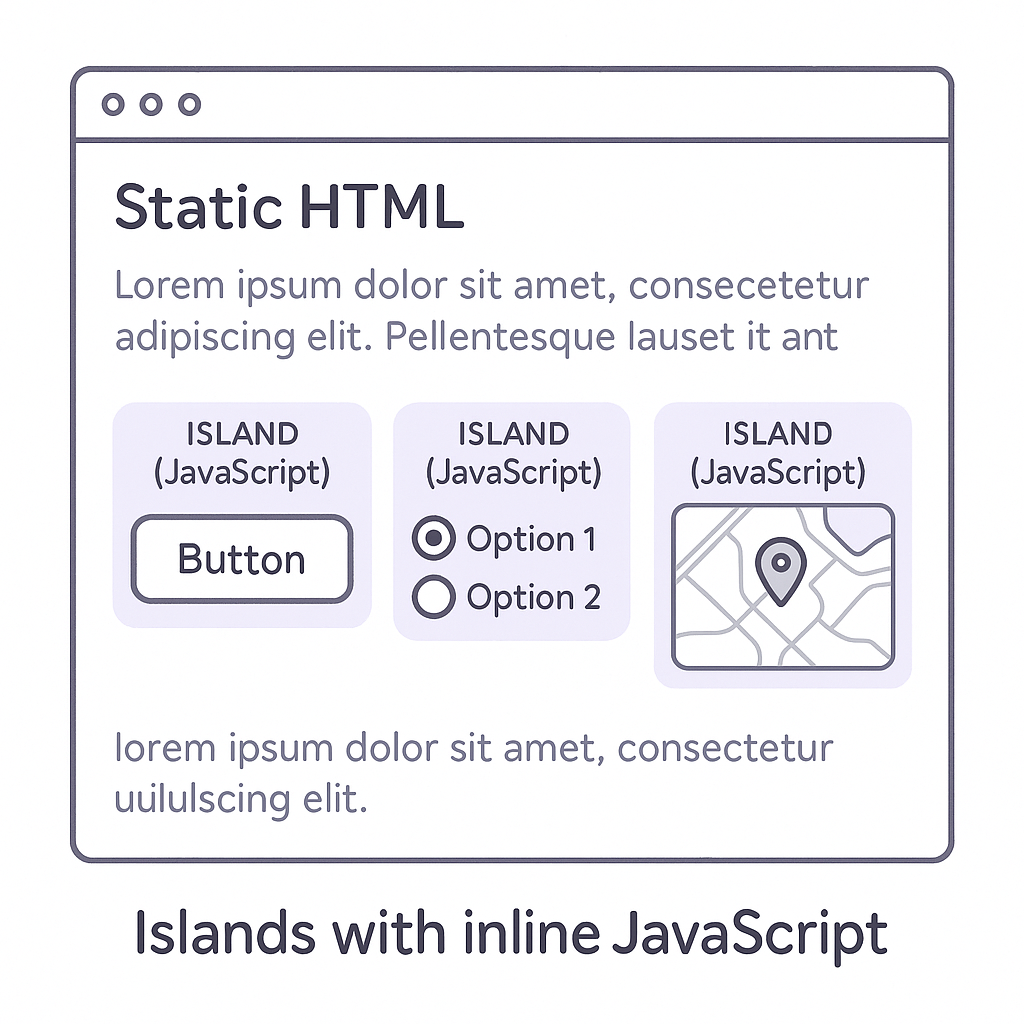
Astro’s “islands” architecture only ships JS for interactive components, sending near-zero JS by default.
Statistic: In benchmarks, Astro pages shipped up to 90% less JavaScript than comparable Next.js pages.
Framework | Avg JS Payload |
|---|---|
Next.js | 100 KB |
Astro | 10 KB |
Island Architecture
Instead of hydrating your entire page, Astro treats each interactive component as an “island” of JS. Everything else remains static HTML until you opt into interactivity.
Prerequisites for Migration
Before you begin, ensure you have the following tools installed and configured:
Node.js v16 or newer: Node.js v16 Release Notes
npm or Yarn: npm Website or Yarn Documentation
Git (for version control): Official Git Documentation
Familiarity with your existing Next.js codebase
Step-by-Step Migration Process
Follow these steps to move the bulk of your site over to Astro.
1. Set Up a New Astro Project
npm create astro@latestor
yarn create astroThis initializes an `astro.config.mjs` and installs core dependencies.
2. Copy Static Assets
Move `/public` assets like images, fonts, `robots.txt` into your new project’s `/public` folder.
3. Migrate Page Routes
Rename your Next.js `/pages/.js(x)` files to `/src/pages/.astro` or `.mdx`.
Adjust frontmatter if you use Markdown/MDX.
4. Convert Components
Change your React components to Astro syntax or wrap them in `<Component client:load />`.
Update import paths and remove any Next.js-specific hooks.
React components: React components guide
5. Handle Data Fetching
Replace `getStaticProps`/`getServerSideProps` with Astro’s frontmatter data fetch if migrating from NextJS pages router.
For dynamic data at request time, consider using Astro server-side rendering .
Next.js Method | Astro Equivalent | Notes |
|---|---|---|
getStaticProps | Frontmatter data fetch | Build time |
getServerSideProps | SSR (astro.config.mjs) | Request time |
API Routes | Astro Endpoints | Server functions |
Middleware | onRequest hook or Edge Functions | Edge logic |
6. Update Styling
Copy your global CSS or Tailwind CSS documentation setup into `/src/styles/`.
Link styles in `src/layouts/Base.astro`.
7. Configure Redirects
If you used `next.config.js` rewrites/redirects, replicate them in your hosting platform
For example:
Netlify: Redirects documentation
Vercel: Project configuration
8. Test and Deploy
Run `npm run dev` to verify local behavior.
Deploy to platforms like Netlify or Vercel.
Migrating Advanced Features
Real-world apps often rely on more than pages and components. Here’s how to handle those extra parts.
API Routes and Serverless Functions
Next.js lets you define `/pages/api/*.js`. In Astro, you can:
Use Endpoints to export functions that run on the server.
Integrate with serverless platforms by placing handlers in designated directories or using platform-specific functions.
For reference, see the Next.js API Routes documentation.
Middleware and Advanced Routing Logic
To migrate Next.js middleware (authentication checks, edge rewrites):
Rewrite your logic in your hosting provider’s edge function format (Cloudflare Workers, Vercel Edge).
For simple redirects or auth guards, consider Astro’s `onRequest` hook .
Internationalization (i18n)
Next.js offers built-in i18n routing. In Astro:
Use the official `@astrojs/i18n` integration.
Structure your `/src/pages/[lang]/...` directories and handle localized frontmatter.
Data Fetching: getStaticProps → Astro
Astro’s frontmatter data fetch runs at build time:
---

const res = await fetch('https://api.example.com/posts');

const posts = await res.json();

---

<ul>

  {posts.map(post =>
    <li>{post.title}</li>
  )}

</ul>
For server-only content, enable SSR in `astro.config.mjs` and use Astro’s `Request` handlers.
Maintaining SEO and Analytics
Ensure your SEO mojo carries over:
Migrate `<Head>` metadata to `<head>` in your base layout.
Transfer structured data JSON-LD scripts.
Preserve `<link rel="canonical">` tags.
Reconfigure analytics (e.g., Google Analytics ) in your new layout.
Key SEO checks:
Meta description
Check | Description |
|---|---|
Meta description | Craft concise summaries for search results |
Open Graph tags | Define titles, images, and descriptions for social sharing |
Canonical URLs | Prevent duplicate content by specifying preferred URLs |
Sitemap generation | Provide a complete URL list for search engine indexing |
Integrating CMS and Image Optimization
Headless CMS Integration
Most patterns carry over. For Contentful or Sanity:
import { createClient } from 'contentful';

const client = createClient({ space: '...', accessToken: '...' });
Contentful JavaScript SDK tutorial: Using the JS CDA SDK
Sanity Documentation: Official Sanity docs
Image Optimization Strategies
Next.js’s `<Image>` auto-optimizes images. In Astro:
Use `@astrojs/image` integration.
Or delegate to your CDN (e.g., Cloudflare Images ).
Component Islands and Web Components
You’re not limited to one UI library. With Astro, you can:
Mix React, Svelte, Vue components.
Leverage Web Components for framework-agnostic widgets.
Strategies for Large-scale Migrations
When you own a monorepo or multiple apps:
Incrementally convert routes: run Next.js and Astro side by side using a reverse proxy .
Migrate one folder or feature flag at a time.
Use automated scripts (e.g., jscodeshift ) to rewrite imports.
This approach lets you deploy continuously without downtime.
Onward to Faster Sites
You’ve covered the essentials: from setting up a fresh Astro project and moving pages/components to handling advanced needs like API routes, middleware, SEO, and large-scale strategies. With this blueprint, your Next.js site can graduate to Astro’s lightweight, performance-focused world—and ship only the JavaScript your users interact with.
:format(webp))
:format(webp))
:format(webp))