:format(webp))
:format(webp))
What’s New in React 19: A Deep Dive
In this article, you’ll get a concise overview of React 19’s biggest changes—from metadata management to optimistic updates—plus advanced tips on TypeScript inference, accessibility, performance and security. By the end, you’ll know how to put React 19’s features to work in real-world apps.
Document Metadata Support
With React 19, managing `<title>`, `<meta>` and other head tags is built-in. You can now declare document metadata alongside your comonents:
import { Head } from 'react';


export default function Page() {

  return (

    <Head>

      <title>My React 19 App</title>

      <meta name="description" content="An intro to React 19 features" />

    </Head>

  );

}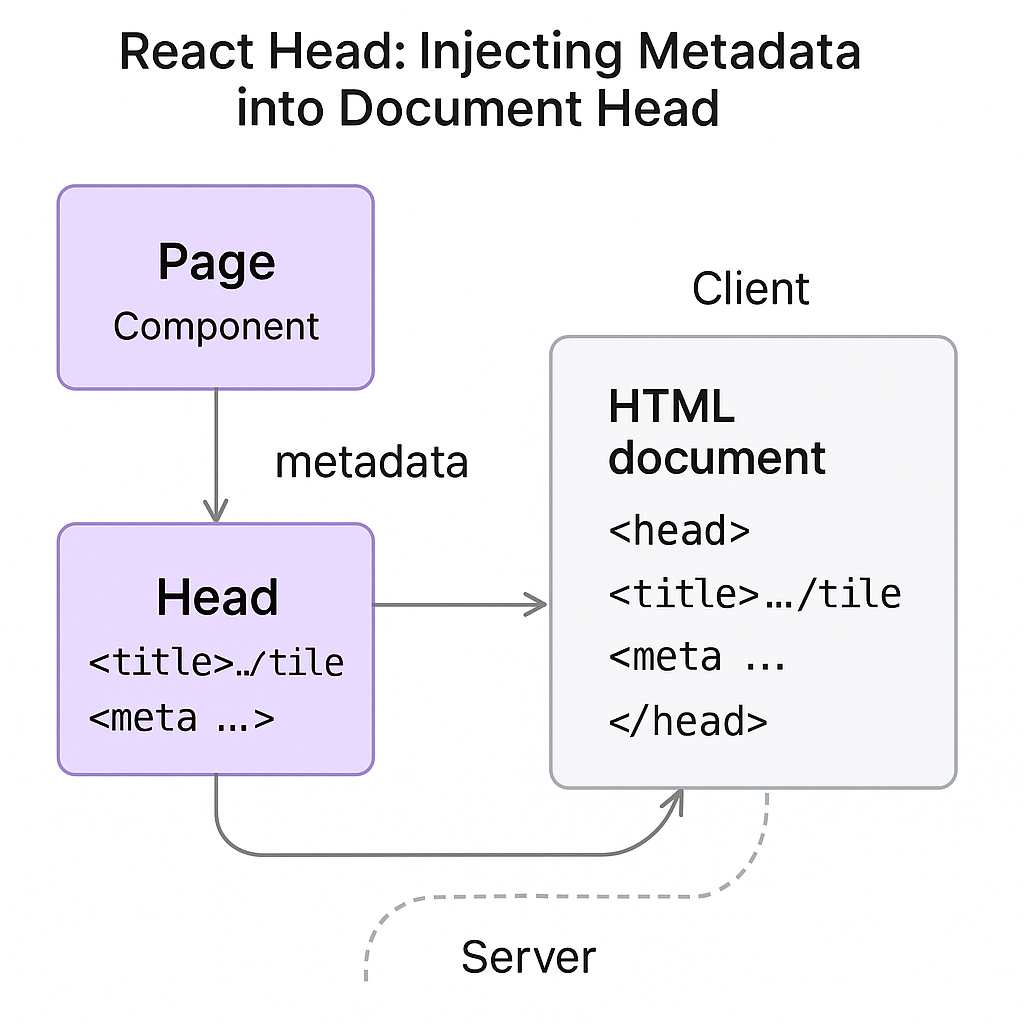
This replaces third-party libraries and ensures metadata updates on both the client and server, as described in the React 19 Release Notes .
Style Sheet Loading Improvements
React 19 adds explicit `preload` and `preinit` for CSS, letting you prioritize critical styles and defer non-essential ones. Use the new props on `<link>` tags:
<link rel="preload" href="/main.css" as="style" />

<link rel="stylesheet" href="/main.css" data-priority="high" />
Attribute | Purpose | When to Use |
|---|---|---|
rel="preload" | Preloads critical CSS before render | Use for above-the-fold styles |
rel="preinit" | Initiates early CSS fetch without applying | Use for very early critical styles |
rel="stylesheet" + data-priority="high" | Applies stylesheet with high priority | Use for essential styles needed at render |
These tweaks help reduce render-blocking for above-the-fold content.
Web Components Integration
You can now embed and manage Web Components seamlessly in React:
function MyWrapper() {

  return <my-custom-element some-attr="value" />;

}
Props, events and refs work as expected, so you can mix Shadow DOM elements without workarounds.
Actions: Simplified Data Mutations
React 19 introduces `action()` to define server-backed operations. Inside components, call an action to mutate data:
import { action } from 'react';


const submitForm = action(async (formData) => {

await fetch('/api/save', { method: 'POST', body: JSON.stringify(formData) });

});


function Form() {

  const [data, setData] = useState({});

  return <button onClick={() => submitForm(data)}>Save</button>;

}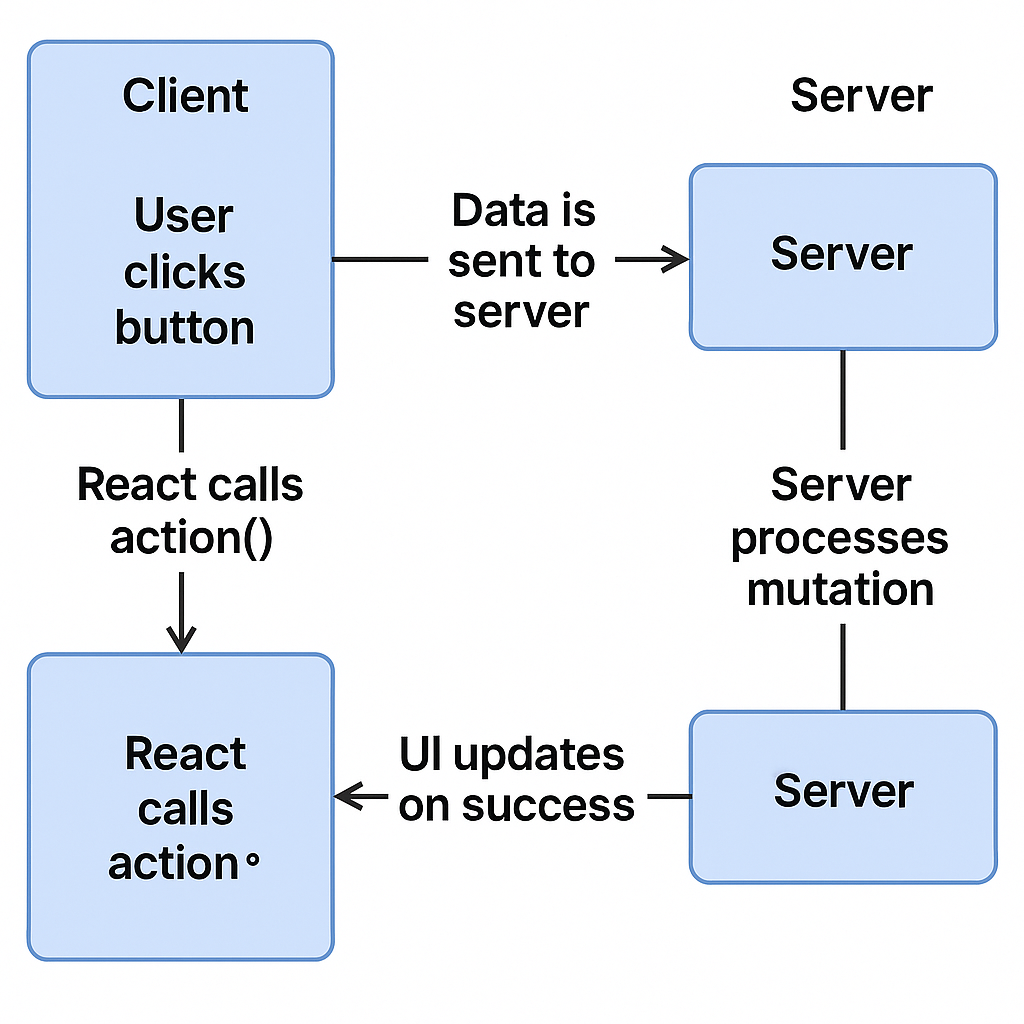
Actions run on the server by default, eliminating manual fetch logic and centralizing mutation handlers, as outlined in the GitHub release notes for React 19 .
Optimistic Updates with useOptimistic
The `useOptimistic` hook lets you update UI instantly while the server request is pending:
const [todos, addTodo] = useOptimistic(initialTodos, (draft, newTodo) => {

  draft.push(newTodo);

});


<button onClick={() => addTodo({ id: 3, title: 'Buy milk' })}>

  Add Todo

</button>
TypeScript Type Inference with New Hooks
TypeScript infers the draft state and action signature automatically. For example, if your todo items have a specific interface, `useOptimistic` will carry that through without extra generics, per TypeScript’s generics documentation . This reduces runtime errors and boosts developer confidence by ensuring type safety at compile time.
Integrating with External State Libraries
You can layer React 19’s optimistic updates on top of Redux, MobX or Zustand. For instance, in Zustand:
import create from 'zustand';

import { useOptimistic } from 'react';


const useStore = create((set) => ({

  todos: [],

  addTodoServer: async (todo) => { / server call / },

}));


function TodoApp() {

  const todos = useStore((s) => s.todos);

  const addTodoServer = useStore((s) => s.addTodoServer);

  const [, addTodo] = useOptimistic(todos, (draft, todo) => draft.push(todo));


  return (

    <button onClick={() => {

      addTodo({ id: 4, text: 'Hello' });

      addTodoServer({ id: 4, text: 'Hello' });

    }}>

      Add

    </button>

  );

}
This pattern ensures your global store stays in sync even when you optimistically update the UI. Refer to the Zustand getting started guide for setup and advanced patterns.
Form State Management: useFormStatus & useFormState
Two new hooks streamline forms and transitions:
`useFormStatus`: tracks submission state (`idle`, `submitting`, `error`).
`useFormState`: bundles input values, dirty flags and validation results.
Hook | Returns | Purpose |
|---|---|---|
useFormStatus | status object with current state | Tracks form submission status (idle, submitting, error) |
useFormState | [form, field] tuple | Manages input values, dirty flags, and validation results |
const status = useFormStatus();

const [form, field] = useFormState({ name: '' });


return (

  <form onSubmit={form.submit}>

    <input {...field('name')} />

      <button disabled={status.submitting}>Submit</button>

  </form>

);
Accessibility Implications
These hooks emit ARIA attributes automatically. For example, `useFormStatus` sets `aria-busy="true"` during submission, helping screen readers announce the busy state as recommended in the WAI-ARIA Authoring Practices Guide . Keyboard navigation remains intact, and you can hook into status changes to announce errors via `aria-live` regions.
Concurrent UI: useDeferredValue & useTransition
React’s concurrent features get finer control:
`useTransition` returns `[isPending, startTransition]` so you can wrap low-priority updates.
`useDeferredValue` holds on to a previous value while new data loads.
const [search, setSearch] = useState('');

const deferredSearch = useDeferredValue(search);


const [isPending, startTransition] = useTransition();


<input onChange={(e) => startTransition(() => setSearch(e.target.value))} />
These hooks help you avoid janky frames in high-latency UIs, as explained in the React documentation on concurrent UI features .
Resource Loading: preload & preinit
Beyond CSS, you can now hint image, script and font loading:
<link rel="preinit" href="/fonts/MyFont.woff2" as="font" type="font/woff2" crossorigin />

<link rel="preload" href="/hero.jpg" as="image" />
This reduces time to interactive by telling the browser what you’ll need next, as detailed in MDN’s guide to the preload resource hint .
React Compiler Introduction
The new React Compiler transforms JSX at build time to highly optimized code. It prunes unused exports, inlines static elements and generates more efficient update logic. Early benchmarks show up to 15% faster initial render times compared to Babel-based builds.
Security Considerations for Server Actions and Mutations
Client-side optimistic updates and server actions introduce potential race conditions and stale data issues. To mitigate:
Validate all inputs server-side even if you’ve updated the UI optimistically.
Use idempotent action handlers so repeated calls don’t cause inconsistent state.
Leverage HTTP caching headers (`ETag`, `Cache-Control`) to avoid exposing outdated data.
Monitor for CSRF and apply anti-forgery tokens on each action request, in line with the OWASP Top 10 .
Bring Your React 19 Skills to Life
You’re now equipped to harness React 19’s metadata API, styles loading, Web Components, optimistic hooks and more. Pair these features with strong TypeScript types, accessible form patterns and secure server logic to build responsive, robust applications. Happy coding!
:format(webp))
:format(webp))
:format(webp))