:format(webp))
:format(webp))
Building Immersive VR and AR Experiences with React
When you finish this guide, you’ll know how to set up a modern React-based VR/AR project, craft interactive 3D scenes, optimize performance, handle state in complex environments, and add advanced features like real-time collaboration and accessibility support.
Why Choose React for VR and AR?
React’s component model and rich ecosystem make it a natural fit for immersive experiences.
Declarative syntax lets you describe 3D scenes and UI in JSX.
A unifying codebase for web, mobile and XR reduces maintenance.
Huge community and libraries—from React Three Fiber to state managers—accelerate development.
Feature | Benefit | Example Library |
|---|---|---|
Declarative Syntax | Enables clear and concise scene definitions | @react-three/fiber (JSX syntax) |
Unifying Codebase | Shared code across web, mobile, and XR platforms | React + React Native + WebXR |
Ecosystem & Community | Access to libraries, tools, and community support | drei, Zustand, Jotai, React Three Fiber |
“React Three Fiber has transformed how we build web-based VR, offering near-native performance with familiar React patterns.” – Paul Henschel, maintainer of React Three Fiber
Setting Up Your Development Environment
A few tools will get you started quickly.
Create a new React app with the official Create React App guide :
npx create-react-app my-xr-app
cd my-xr-app
Install core packages:
npm install three @react-three/fiber @react-three/dreiEnable WebXR in your browser (Chrome/Firefox):
See MDN’s guide on the [WebXR Device API](https://developer.mozilla.org/en-US/docs/Web/API/WebXRDeviceAPI).
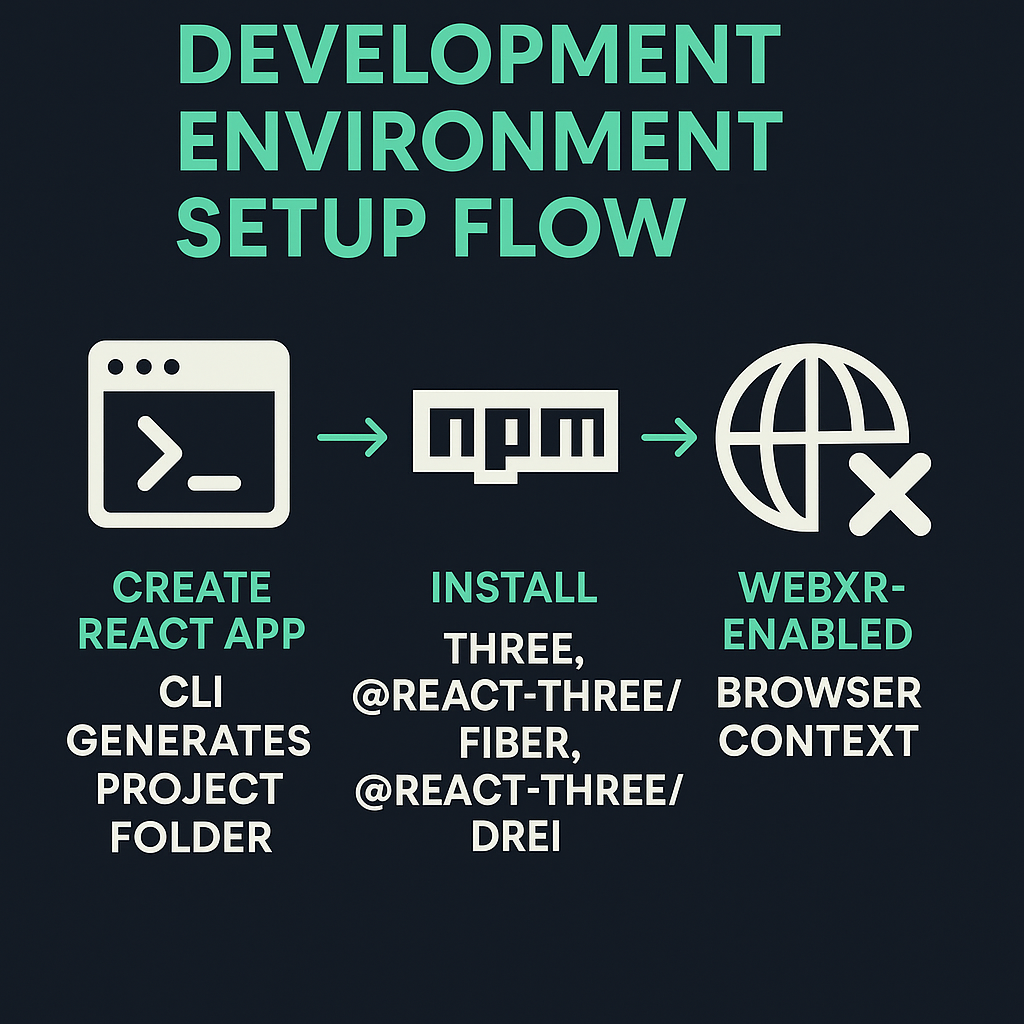
Installing React Three Fiber and Drei for Performance Monitoring
@react-three/fiber: declarative Three.js in React ( getting started docs ).
@react-three/drei: collection of helpers and a `<PerformanceMonitor>` component ( source on GitHub ).
import { Canvas } from '@react-three/fiber'
import { PerformanceMonitor } from '@react-three/drei'
Enabling WebXR Support in Browser
Use secure context (HTTPS).
Include `<meta name="viewport" content="width=device-width, initial-scale=1.0" />`.
Request an XR session in code:
navigator.xr.requestSession('immersive-vr').then(session => { / setup session / })
Crafting 3D Scenes and Interactivity
React Three Fiber builds on Three.js to create rich worlds.
Creating a scene: wrap your app in `<Canvas>`.
3D objects: use `<mesh>`, `<boxBufferGeometry>`, `<meshStandardMaterial>`.
Controls: integrate `<OrbitControls>` or custom handlers.
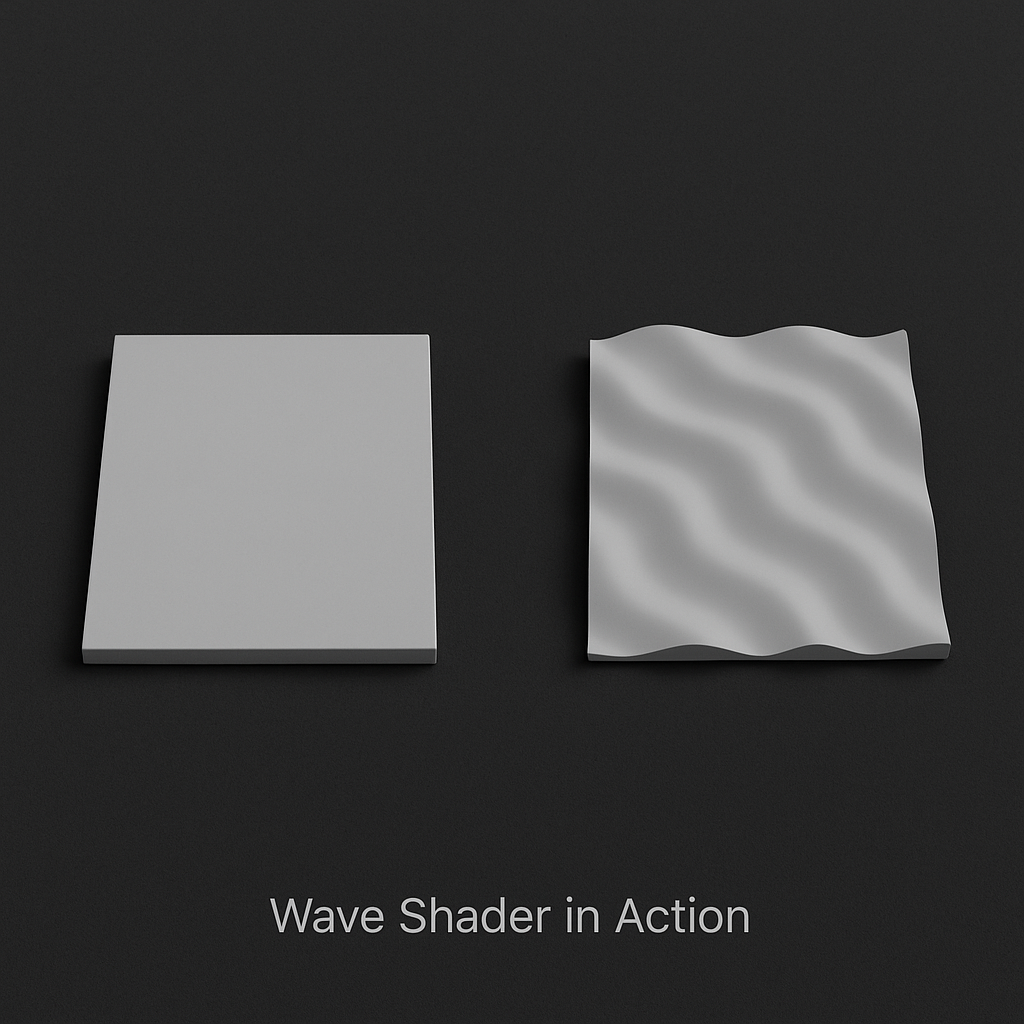
Using Custom Shaders in React Three Fiber
For advanced visuals, write GLSL or use node editors:
import { shaderMaterial } from '@react-three/drei'

const WaveMaterial = shaderMaterial(
  { time: 0 },
  /* vertex shader */ `
  varying vec2 vUv;

  void main() {
    vUv = uv;
    gl_Position = projectionMatrix  modelViewMatrix  vec4(position,1.0);
  }
  `,

  /* fragment shader */ `
  uniform float time;
  varying vec2 vUv;

  void main() {
    gl_FragColor = vec4(abs(sin(time + vUv.xyx)), 1.0);
  }
  `
);
Procedural Content Generation
Algorithmic scenes can adapt on the fly:
Use noise libraries like simplex-noise on npm for terrain.
Integrate AI-driven asset creation via tools like RunwayML’s API.
Optimizing Performance and State Management
Large scenes demand careful tuning.
Minimize draw calls by merging geometries.
Use frustum culling and level of detail (LOD).
Lazy-load assets with Suspense.
Technique | Description | Benefit |
|---|---|---|
Minimize Draw Calls | Merge geometries to reduce GPU calls | Improves frame rates |
Frustum Culling & LOD | Render only visible objects and use lower-detail models at distance | Reduces rendering load |
Lazy-load Assets | Use React Suspense to load models on demand | Faster initial load times |
Performance Profiling Tools
Chrome DevTools Graphics panel for inspecting WebGL draw calls.
`<PerformanceMonitor>` from drei.
Stats.js integrations.
State Management Strategies
Keep scene graph and UI in sync:
Redux for global scene state ( official Redux docs ).
Zustand or Jotai for lightweight stores.
Use React’s context sparingly to avoid re-render storms.
Advanced Features: Networking, Accessibility, Exporting Content
A few touches can make your app truly next-gen.
Real-time Collaboration with WebRTC and Socket.io
Use the WebRTC.org developer guide for peer-to-peer streams.
Combine with Socket.io to sync positions, actions and voice chat.
Accessibility in Immersive Interfaces
Spatial audio cues to guide navigation via the Gamepad API.
Haptic feedback through vibration actuators.
Alternative controls (keyboard, voice commands).
Exporting User-Generated Content
Let users save their creations:
Convert meshes to GLTF with Three.js’s GLTFExporter example .
Trigger a download:
import { GLTFExporter } from 'three/examples/jsm/exporters/GLTFExporter'

const exporter = new GLTFExporter()

exporter.parse(mesh, gltf => {

// download gltf

})
Testing, Debugging, and Cross-Browser Considerations
Immersive apps live in diverse environments.
Browser Compatibility Issues
Hand-tracking and passthrough video vary by device and browser.
Feature-detect with `navigator.xr.isSessionSupported('immersive-ar')`.
Debugging WebGL with Chrome DevTools
Profile GPU usage under the “Performance” tab.
Inspect draw calls in “Graphics” panel.
Looking Ahead: The Future of React in VR and AR
Immersive tech evolves rapidly:
Deeper WebXR features: eye-tracking, spatial anchors.
AI-powered procedural worlds.
Greater convergence of mobile AR and web VR experiences.
Keep an eye on the WebXR Device API Working Group for updates.
Final Frontier
You now have the blueprint for a robust React-powered VR/AR project—from initial setup to advanced interactivity, performance tuning, networking and accessibility. Dive in, experiment with shaders and procedural worlds, and bring your immersive vision to life.
:format(webp))
:format(webp))
:format(webp))