:format(webp))
:format(webp))
A Practical Guide to Migrating Your Angular App to React
By the end of this article, you’ll understand how to plan and execute a migration from Angular to React, choose the right strategy, leverage automated tools, handle key code differences, and ensure your new application runs smoothly and efficiently.
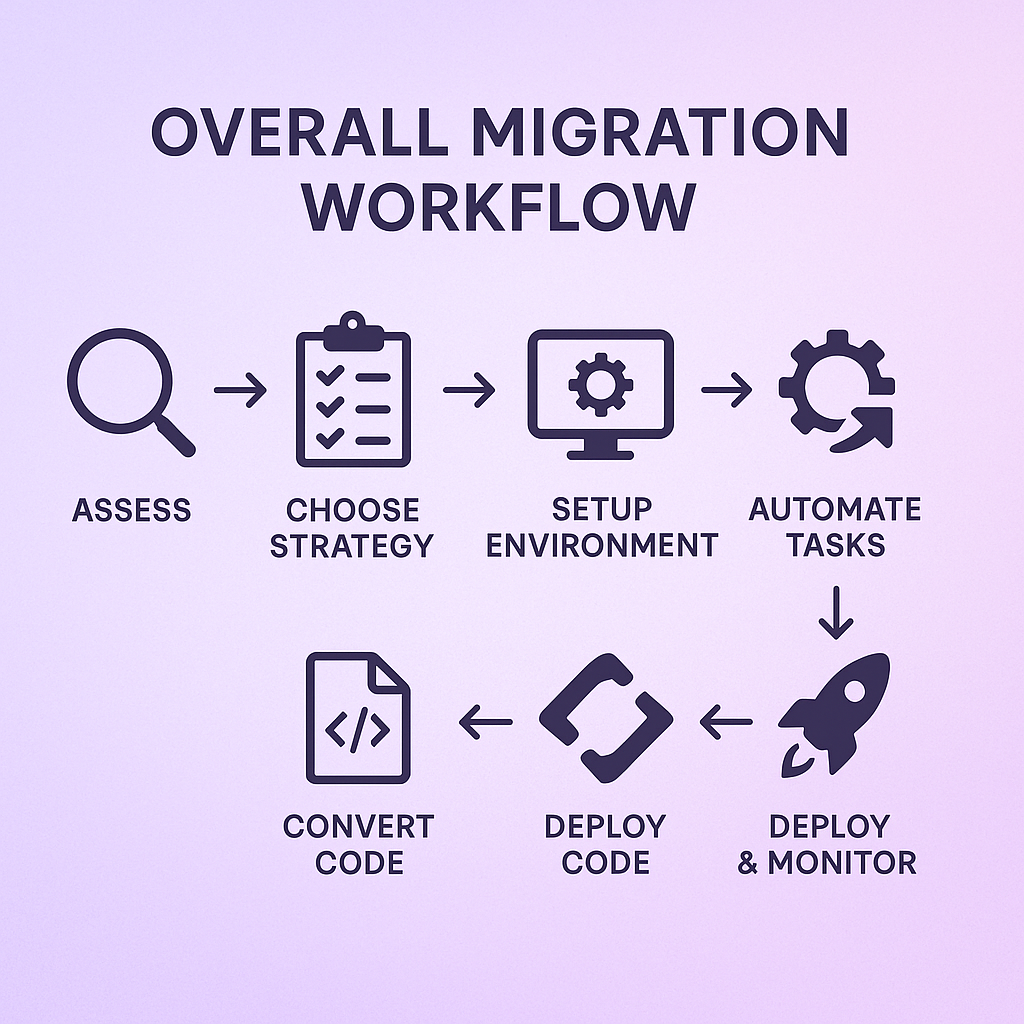
Assess Your Current Angular Application
Before writing a single line of React code, take stock of what you have:
Inventory features, modules, third-party libraries
Identify areas using Angular Universal for server-side rendering ( Angular Universal guide )
Note critical performance bottlenecks (use Lighthouse for metrics)
Review testing setup (Jasmine/Karma vs what you’ll adopt later)
This lets you set clear goals, estimate effort, and spot hidden dependencies early.
Choose a Migration Strategy
There isn’t a one-size-fits-all approach. Common patterns include:
Incremental (“Strangler Fig”)
– Migrate modules piece by piece
– Run Angular and React side by side with Module Federation or single-spa
Big Bang Rewrite
– A full rewrite in one go
– Faster cut-over but higher risk and longer downtime
Hybrid Co-existence
– Wrap Angular components inside React (or vice versa)
– Teams can deliver new features in React while legacy parts stay operational
Strategy | Description | Benefits | Risks |
|---|---|---|---|
Incremental | Piecewise migration | Low risk | Longer project timeline |
Big Bang Rewrite | Full rewrite | Single release cutover | High risk of downtime |
Hybrid Co-existence | Wrap components | Team flexibility | Increased complexity and overhead |
Cam Jackson, creator of single-spa, said “Micro frontends let teams work independently on features and ship releases faster.” Learn more about this approach at Micro-Frontends .
Set Up Your React Development Environment
To parallel your Angular setup:
Scaffold your app with Vite or e.g. Next.js if you need SSR
Install TypeScript, ESLint, Prettier for consistent code style
Choose your package manager (npm, Yarn, pnpm)
Automate Repetitive Tasks with Codemods
Manual migration is error-prone. Try these tools first:
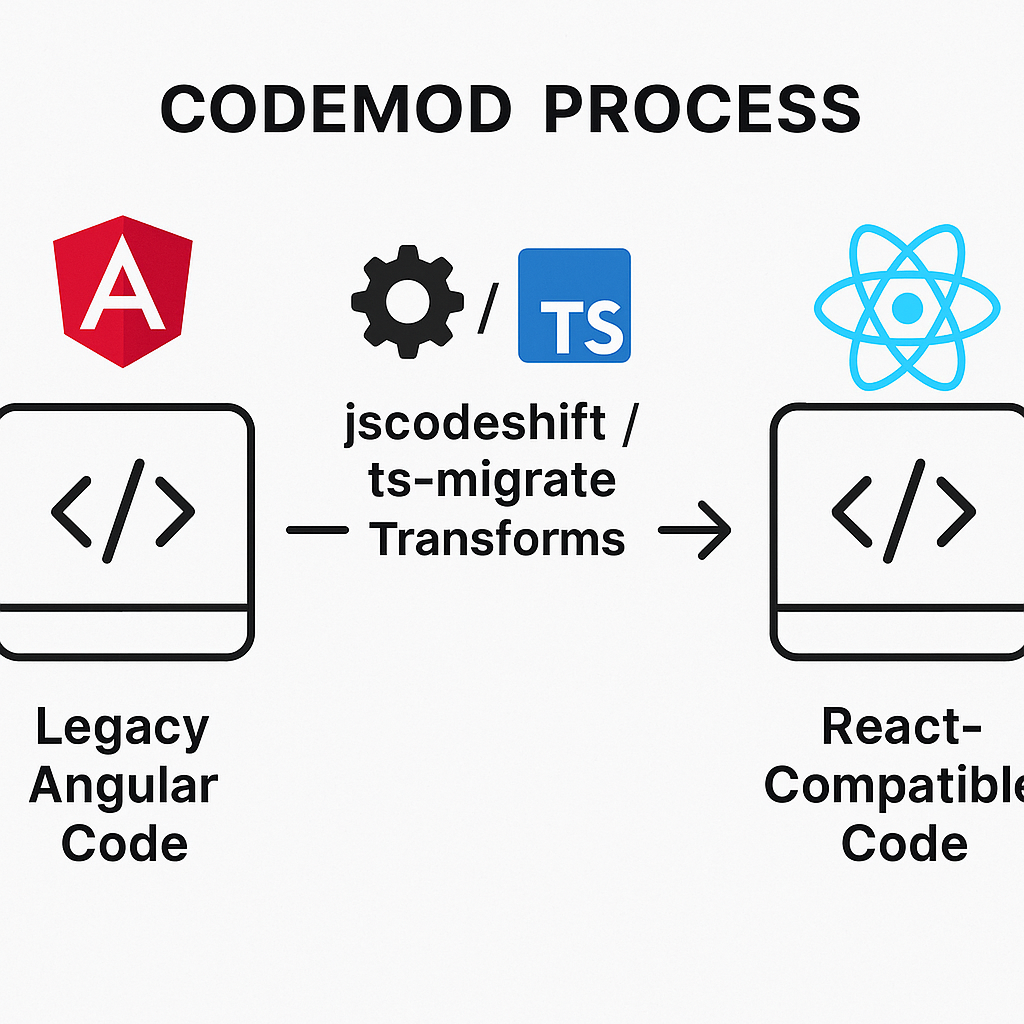
jscodeshift: A toolkit for writing custom transforms
ts-migrate: Helps upgrade TypeScript dependencies during migration
These can rename files, adjust imports, or wrap directives in JSX, saving hours of tedium.
Convert Templates and Components
Angular’s templates (with `ngIf`, `ngFor`) differ from JSX loops and conditionals:
Handling Structural Directives
In Angular:
<li *ngFor="let item of items">{{ item.name }}</li>In React:
{items.map(item => (
  <li key={item.id}>{item.name</li>
))}
Use codemods to catch common patterns, then refine by hand for edge cases.
Address Dependency Injection
Angular offers a built-in DI system. In React:
Use Context API for global services
Or adopt packages like InversifyJS (MIT license) for more formal DI
Migrating services may mean rethinking where initialization and teardown happen.
Rethink State Management
Angular teams often use NgRx; React land offers:
Zustand
Recoil
Switching to Redux, for example, requires embracing immutability and pure reducer functions. A mental shift from Angular’s `subscribe` patterns to React’s hooks (e.g., `useReducer`) will help.
Migrate Forms and Validation
Complex Reactive Forms in Angular translate to:
Formik – schema-based validation with Yup
React Hook Form – minimal re-renders and small bundle size
Map your existing form validators to new libraries, and run automated tests to confirm parity.
Integrate APIs and Data Fetching
Angular’s `HttpClient` and services become React hooks:
import { useEffect, useState } from 'react';

function useUsers() {

  const [users, setUsers] = useState([]);

  useEffect(() => {

    fetch('/api/users')

      .then(res => res.json())

      .then(setUsers);

   }, []);

  return users;

}
For caching and revalidation, consider SWR or React Query.
Feature | SWR | React Query |
|---|---|---|
Data Fetching | Yes | Yes |
Caching Strategy | Stale-while-revalidate | Stale-while-revalidate & more |
Mutations Support | Limited (experimental) | Full, robust support |
Built-in Devtools | No | Yes |
Bundle Size | Small (~8 KB) | Larger (~32 KB) |
Set Up Routing and Navigation
Replace Angular Router with React Router :
<BrowserRouter>

  <Routes>

    <Route path="/" element={<Home />} />

    <Route path="/products" element={<Products />} />

  </Routes>

</BrowserRouter>
Test nested routes and lazy-loaded chunks to mirror your Angular setup.
Shift Your Testing Framework
Move from Jasmine/Karma to:
Jest testing framework ( Jest )
React Testing Library intro ( React Testing Library )
Rewrite unit tests and snapshots; set up CI to run them automatically.
Optimize Performance
React brings its own toolset:
`React.memo`, `useMemo`, `useCallback` for memoization
Code-splitting with `React.lazy` and `Suspense`
SSR for critical pages via Next.js
According to the 2021 State of JS survey , 80% of developers expressed satisfaction with React compared to 60% for Angular.
Rollout, Monitor, and Fine-Tune
Plan a phased release:
Deploy to a staging environment
Enable feature flags for new React modules
Monitor errors (Sentry, LogRocket)
Track performance
Gradually flip flags off Angular features
This keeps users unaware of the transition and lets you catch issues early.
Wrapping Up Your Migration Journey
Switching frameworks is a big task, but a structured approach helps you maintain stability, preserve SEO benefits through SSR, and introduce React’s rich ecosystem at your own pace. Armed with codemods, micro-frontend techniques, and a clear roadmap, you’ll transform your codebase without losing sight of quality or user experience.
:format(webp))
:format(webp))
:format(webp))